

Hey there! As an accelerometer supplier, I've seen firsthand how these nifty devices can revolutionize various industries. Whether you're into automotive, aerospace, or consumer electronics, optimizing the use of an accelerometer is crucial to get the most out of it. In this blog post, I'll share some tips and tricks on how to do just that.
Understanding the Basics
First things first, let's quickly go over what an accelerometer is. Simply put, it's a sensor that measures acceleration forces. These forces can be due to gravity, movement, or vibration. Accelerometers come in different types, each with its own set of features and applications.
One popular type is the MEMS Accelerometer. MEMS stands for Micro-Electro-Mechanical Systems, and these accelerometers are tiny, low-cost, and power-efficient. They're commonly used in smartphones, wearables, and other consumer devices for things like screen rotation, step counting, and motion sensing.
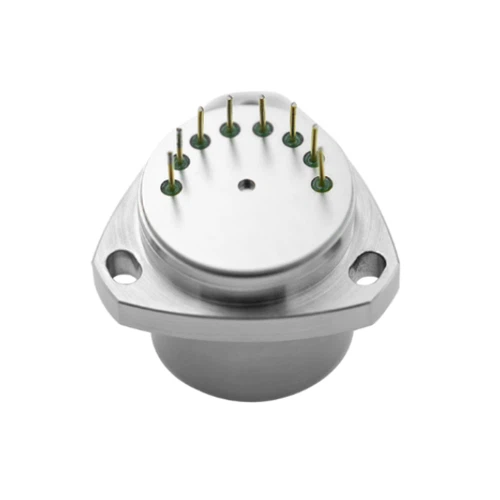
Another type is the Digital Output Quartz Flexure Accelerometer. These are more high-precision and are often used in aerospace, navigation, and industrial applications where accurate acceleration measurements are critical.
And then there's the High-Temperature Accelerometer Sensor, which is designed to operate in extreme temperature environments. They're used in industries like oil and gas, automotive engine testing, and aerospace propulsion systems.

Choosing the Right Accelerometer
The first step in optimizing the use of an accelerometer is choosing the right one for your application. Here are some factors to consider:
- Sensitivity: This refers to how much the accelerometer's output changes for a given change in acceleration. Higher sensitivity means it can detect smaller changes in acceleration, but it may also be more prone to noise.
- Range: The range is the maximum and minimum acceleration values that the accelerometer can measure. Make sure to choose a range that's appropriate for your application. For example, if you're measuring the acceleration of a car, you'll need a different range than if you're measuring the movement of a smartphone.
- Accuracy: This is how close the accelerometer's measurements are to the actual acceleration values. Higher accuracy is usually better, but it also comes at a higher cost.
- Bandwidth: The bandwidth determines how quickly the accelerometer can respond to changes in acceleration. A higher bandwidth is needed for applications that involve fast movements or vibrations.
- Environmental Conditions: Consider the temperature, humidity, and other environmental factors where the accelerometer will be used. Some accelerometers are designed to operate in harsh environments, while others are more suitable for indoor or controlled environments.
Installation and Mounting
Once you've chosen the right accelerometer, the next step is to install and mount it correctly. Here are some tips:
- Mounting Location: The location where you mount the accelerometer can have a big impact on its performance. Make sure to mount it as close as possible to the source of the acceleration you want to measure. For example, if you're measuring the vibration of a machine, mount the accelerometer directly on the machine.
- Mounting Method: There are different ways to mount an accelerometer, such as using adhesives, screws, or magnetic mounts. Choose the method that's most appropriate for your application and the type of accelerometer you're using. Make sure the mount is secure and doesn't introduce any additional vibrations or noise.
- Orientation: The orientation of the accelerometer can also affect its measurements. Make sure to mount it in the correct orientation according to the manufacturer's instructions. For example, some accelerometers are designed to measure acceleration in a specific direction, so you need to mount it accordingly.
Calibration
Calibration is an important step in ensuring the accuracy of your accelerometer measurements. Over time, the accelerometer's performance may drift due to factors like temperature changes, aging, or mechanical stress. Calibration helps to correct these drifts and ensure that the accelerometer is measuring accurately.
Here's how you can calibrate an accelerometer:
- Zero Calibration: This involves measuring the accelerometer's output when there is no acceleration (i.e., when it's at rest). You can then adjust the output to zero to account for any offsets.
- Sensitivity Calibration: This involves measuring the accelerometer's output at known acceleration values and then adjusting the sensitivity to match the actual values. You can use a calibration device or a reference accelerometer to perform this calibration.
It's recommended to calibrate your accelerometer regularly, especially if it's used in critical applications or if it's exposed to harsh environments.
Signal Conditioning and Processing
After the accelerometer has measured the acceleration, the next step is to condition and process the signal. Here are some things to consider:
- Amplification: The output signal from the accelerometer may be very small, so you may need to amplify it to make it easier to measure and process. You can use an amplifier circuit or a signal conditioning module to do this.
- Filtering: The accelerometer's output may contain noise and other unwanted signals. You can use a filter to remove these signals and improve the quality of the measurement. There are different types of filters, such as low-pass filters, high-pass filters, and band-pass filters, and you need to choose the one that's most appropriate for your application.
- Digital Conversion: If you're using a digital accelerometer, the output signal will already be in digital form. However, if you're using an analog accelerometer, you'll need to convert the analog signal to a digital signal using an analog-to-digital converter (ADC).
- Data Analysis: Once you have the digital signal, you can use software or algorithms to analyze the data. You can calculate things like the average acceleration, the peak acceleration, and the frequency spectrum of the acceleration. This can help you understand the behavior of the acceleration and identify any potential problems or anomalies.
Maintenance and Troubleshooting
Regular maintenance and troubleshooting can help to ensure the long-term performance of your accelerometer. Here are some tips:
- Inspection: Regularly inspect the accelerometer for any signs of damage or wear. Check the mounting, the cables, and the connectors to make sure they're in good condition.
- Cleaning: Keep the accelerometer clean and free of dirt, dust, and other contaminants. You can use a soft brush or a compressed air can to clean it.
- Troubleshooting: If you notice any problems with the accelerometer's performance, such as inaccurate measurements or a noisy output, you need to troubleshoot the issue. Check the power supply, the connections, and the calibration to see if there are any issues. You can also refer to the manufacturer's documentation or contact their technical support for help.
Conclusion
Optimizing the use of an accelerometer involves choosing the right one for your application, installing and mounting it correctly, calibrating it regularly, conditioning and processing the signal, and performing regular maintenance and troubleshooting. By following these tips, you can get the most out of your accelerometer and ensure accurate and reliable measurements.
If you're interested in purchasing an accelerometer or have any questions about optimizing its use, feel free to reach out to us. We're here to help you find the right solution for your needs.
References
- Manufacturer's documentation for various accelerometer models
- Technical papers on accelerometer design and application
- Industry standards and guidelines for accelerometer use and calibration