

Hey there! I'm an IMU supplier, and today I wanna chat about how to use an Inertial Measurement Unit (IMU) in a virtual tour project. If you're into creating immersive virtual experiences, you've come to the right place.
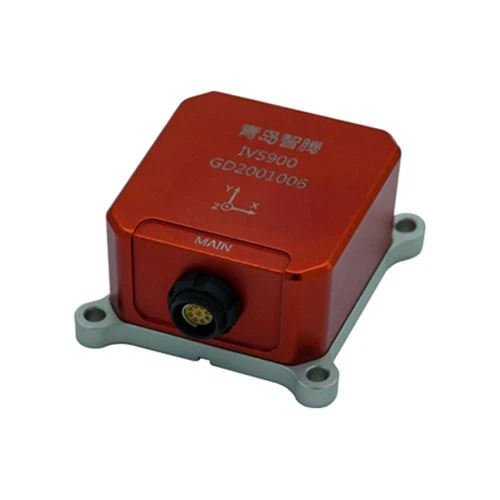
First things first, let's get a basic understanding of what an IMU is. An Inertial Measurement Unit IMU is a device that measures and reports a body's specific force, angular rate, and sometimes the magnetic field surrounding the body, using a combination of accelerometers, gyroscopes, and sometimes magnetometers. In a virtual tour project, this little gadget can do wonders to make the experience more realistic and engaging.
Why Use an IMU in a Virtual Tour?
When you're creating a virtual tour, the goal is to make the user feel like they're actually there. An IMU can help achieve this by tracking the user's movements in real - time. For example, if a user turns their head in the real world, the IMU can detect this movement and update the virtual view accordingly. This creates a more immersive and natural experience, as opposed to just having a static or pre - programmed virtual tour.
Step 1: Choose the Right IMU
There are a bunch of different IMUs out there, and choosing the right one for your virtual tour project is crucial. You need to consider factors like accuracy, sensitivity, and the sampling rate.
- Accuracy: The accuracy of an IMU determines how precisely it can measure the movements. In a virtual tour, high accuracy is essential for a smooth and realistic experience. If the IMU is inaccurate, the virtual view might not match the user's real - world movements, which can be really off - putting.
- Sensitivity: Sensitivity refers to how well the IMU can detect small movements. In a virtual tour, users might make subtle movements, and the IMU needs to be able to pick up on these. A highly sensitive IMU will ensure that even the slightest head tilt or turn is accurately reflected in the virtual environment.
- Sampling Rate: The sampling rate is how often the IMU takes measurements. A higher sampling rate means more frequent measurements, which can result in a more responsive and accurate tracking. In a fast - paced virtual tour, a high sampling rate is really important.
Step 2: Integrate the IMU with Your Virtual Tour Software
Once you've chosen the right IMU, the next step is to integrate it with your virtual tour software. This can be a bit tricky, but there are a few general steps you can follow.
- Understand the IMU's Communication Protocol: Different IMUs use different communication protocols to send data to your computer or device. Common protocols include I2C, SPI, and UART. You need to understand which protocol your IMU uses and how to interface with it using your programming language (e.g., Python, C++, etc.).
- Write the Driver Code: You'll need to write code to read the data from the IMU. This code will depend on the communication protocol and the specific IMU you're using. Most IMU manufacturers provide sample code and documentation to help you get started.
- Connect the IMU to Your Device: Physically connect the IMU to your computer or device using the appropriate cables and connectors. Make sure the connections are secure and that the power supply is stable.
Step 3: Calibrate the IMU
Calibration is an important step in ensuring the accuracy of the IMU. Even a high - quality IMU can have some errors due to manufacturing variations and environmental factors. Here's how you can calibrate your IMU:
- Accelerometer Calibration: The accelerometer measures the acceleration of the device. To calibrate it, you need to place the IMU in known orientations (e.g., flat on a surface, vertically upright) and record the measured acceleration values. Then, you can use these values to calculate the calibration parameters.
- Gyroscope Calibration: The gyroscope measures the angular rate of the device. To calibrate it, you need to keep the IMU completely still for a few seconds and record the measured angular rate values. The average of these values is the offset, which you can use to adjust the gyroscope readings.
- Magnetometer Calibration (if applicable): If your IMU has a magnetometer, you'll need to calibrate it to account for magnetic interference. This can be done by rotating the IMU in all directions in a magnetic - field - free environment and recording the magnetometer readings.
Step 4: Use the IMU Data in Your Virtual Tour
Once the IMU is calibrated and integrated with your virtual tour software, you can start using the data to enhance the virtual tour experience.
- Head Tracking: The most common use of an IMU in a virtual tour is for head tracking. You can use the accelerometer and gyroscope data to determine the orientation of the user's head. Then, you can update the virtual view accordingly, making it follow the user's head movements.
- Gesture Recognition: You can also use the IMU data to recognize gestures. For example, a quick shake of the head could be used to trigger a specific action in the virtual tour, like switching to the next room or activating a special feature.
Step 5: Test and Optimize
After implementing the IMU in your virtual tour, it's important to test it thoroughly. Try different movements and scenarios to make sure the virtual view updates smoothly and accurately. Pay attention to any lag or glitches, and make adjustments as needed.
You might also need to optimize the performance of the IMU and the virtual tour software. This could involve reducing the computational load by optimizing your code, or adjusting the calibration parameters to improve accuracy.
Conclusion
Using an IMU in a virtual tour project can take the experience to a whole new level. It adds a sense of realism and engagement that static virtual tours just can't match. As an IMU supplier, I've seen firsthand how these devices can transform a simple virtual tour into an immersive adventure.
If you're working on a virtual tour project and need an IMU, I'd love to talk to you. We've got a range of high - quality IMUs that are perfect for various applications, and we can provide you with the support and guidance you need to get the most out of them. Just reach out, and we can start a discussion about your specific needs.
References
- Various research papers on inertial measurement units and virtual reality technology.
- Manufacturer documentation of different IMUs.